

One of the sessions that caught my attention during Sitecore Symposium 2026 was the introduction of the Sitecore Developer MCP server. While MarketingIQ and Scrunch were among the major announcements from a marketing perspective, the Developer MCP was something I particularly wanted to explore from a developer’s perspective.
I’ve been interested in how AI coding assistants can help with Sitecore development beyond simply generating code. Creating components, defining content models, registering components in Sitecore and making them available to marketers are all areas where there is room to simplify the development experience. On November 13, 2026, Sitecore officially released its Developer MCP server in beta.
Having gone through the documentation and revisited some of the material presented at Symposium, I wanted to take a closer look at what it actually brings to the table, how it differs from the Marketer MCP and what it could mean for the way we build Sitecore solutions.
What exactly is MCP?
MCP stands for Model Context Protocol. It is an open standard that allows AI applications to interact with external systems, discover available tools and perform supported operations. Let’s take a simple Sitecore development scenario.
I am working on a Next.js application using the Sitecore Content SDK and I need to create a new component. Without an MCP integration, an AI coding assistant can help me generate the React component, TypeScript interfaces, styling and even suggest the structure of the corresponding Sitecore content type.
However, generating the code is only part of the job. I still need to create or register the associated definitions in Sitecore, establish the relationship between the component and its content model and configure where the component can be used. Depending on the implementation, this might involve the Sitecore interface, APIs, scripts, serialization or a combination of these.
With MCP, the AI assistant can discover and invoke supported Sitecore operations directly. This is an important distinction. We are moving from an AI assistant that tells us what to do toward one that can also perform parts of the work.
What is the Sitecore Developer MCP server?
The Sitecore Developer MCP server is Sitecore’s official MCP integration for development-related operations in SitecoreAI. Unlike a generic coding assistant, which primarily works with the source code and files available to it, the Developer MCP gives compatible AI agents access to supported operations within SitecoreAI itself.
The initial release focuses on three areas:
- Component management.
- Content modeling.
- Site discovery and content item creation.
The server is remotely hosted by Sitecore and uses Streamable HTTP as its transport mechanism, together with MCP OAuth for authentication. At the time of writing, the server is in beta and provides 13 tools.
It is worth pointing out that this does not make the Content SDK, REST APIs or Sitecore CLI obsolete. The Developer MCP provides another way of interacting with the platform, specifically designed for AI agents. Traditional APIs and scripts still have their place, particularly when we need deterministic, repeatable automation in CI/CD pipelines.
Beyond the Developer MCP: The Kajoo Approach
What makes this announcement particularly interesting to me is the work we have already been doing at Kajoo. While the Sitecore Developer MCP beta focuses on exposing specific development operations to AI agents, Kajoo takes a broader approach by bringing these capabilities together within an integrated agentic development workflow. The focus goes beyond performing individual Sitecore operations to connecting them with the wider development process, reducing the need for developers to manually coordinate each step.
Where I see Kajoo having an advantage today is in the orchestration of the overall development experience rather than simply providing access to individual tools. The introduction of Sitecore’s Developer MCP is an encouraging step in the same direction and further reinforces the relevance of the approach we have been taking at Kajoo. As the Developer MCP matures, I also see opportunities for it to complement what we are building and further streamline the Sitecore development experience.
More on Kajoo.ai in coming articles. Stay tuned!
Why do we need a Developer MCP when we already have skills and APIs?
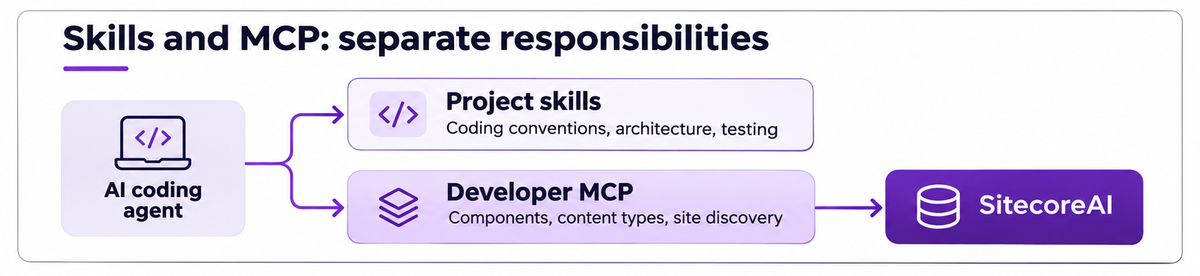
This was one of the more interesting points covered during the Symposium session. When building AI-assisted Sitecore workflows, we often end up creating our own toolkit. That toolkit might include shared Sitecore skills, project-specific instructions, helper scripts, authentication logic, API calls and CLI commands.
For example, a skill responsible for creating a Sitecore component might need to know:
- How to identify the correct Sitecore environment.
- How to authenticate against the appropriate API.
- Which content type needs to be created.
- How the component should be registered.
- How the component and content type should be associated.
- How to validate the resulting configuration.
Now imagine maintaining these instructions and scripts across several projects. It can quickly become difficult to maintain, especially when APIs evolve or when different teams implement the same operation in slightly different ways. The Developer MCP introduces a common access layer for supported operations. Instead of embedding all the platform interaction logic within our custom skills, the MCP server can handle the supported Sitecore operations.
The skills can then focus more on project-specific knowledge: naming conventions, coding standards, architecture decisions, testing requirements and the way components should be implemented. I see this as an important separation of responsibilities.
Skills describe how we want the work to be done. MCP provides the tools through which the agent can interact with the platform.
We still need both but we potentially need fewer custom scripts covering the same responsibilities.
Developer vs. Marketer MCP
Sitecore already provides a Marketer MCP. So where does the Developer MCP fit in? The easiest way to understand the difference is to look at the types of work each one supports. The Developer MCP focuses on establishing and managing the building blocks of a Sitecore implementation. This includes components, content types and their associations.
The Marketer MCP focuses on using those building blocks to create and manage experiences. This includes working with pages, content, layouts and personalization. Consider a campaign landing page that requires a countdown component. If the countdown component already exists, the Marketer MCP can help place it on the page and configure the relevant content.
If the component does not exist, the Developer MCP can help establish the necessary component and content type definitions, while the coding assistant implements the corresponding front-end code. Once the component is properly integrated and available, the Marketer MCP can use it as part of the campaign experience.
This is where the two MCP servers complement each other rather than compete. For me, the interesting part is not necessarily using one MCP server in isolation. It is combining their capabilities within the same development and content creation workflow.
A closer look at the 13 beta tools
The Symposium presentation provided a breakdown of the initial tools, which can be divided into three categories.

Component management: 6 tools
| Tool | Purpose |
|---|---|
| list_components | Discover existing component definitions. |
| list_component_summaries | Retrieve a lightweight overview of available components. |
| get_component | Inspect the details of a particular component. |
| create_component | Register a new component in Sitecore. |
| update_component | Modify an existing component definition. |
| list_component_categories | Discover available component categories. |
These tools are particularly useful when an AI agent needs to understand an existing implementation before introducing something new. Rather than immediately creating a component, the agent can inspect what is already available, understand the conventions being used and determine whether an existing component can be reused.
Creating a component through MCP does not necessarily mean that its front-end implementation has been written, tested and deployed. That remains a separate responsibility of the coding agent and development workflow.
Content modeling: 5 tools
| Tool | Purpose |
|---|---|
| list_content_types | Discover existing content types. |
| get_content_type | Retrieve the definition of a content type. |
| create_content_type | Create a new content type. |
| update_content_type | Modify an existing content type. |
| get_content_type_validation_rules | Discover supported validation rules. |
This is probably one of the areas I am most interested in. Content modeling is fundamental to any Sitecore implementation. A poorly designed content model can introduce unnecessary complexity that becomes difficult to address later.
An agent that can inspect existing content types before creating new ones has a better opportunity to follow established patterns rather than inventing its own structure. The validation rules tool is also important because it gives the agent a way to discover supported constraints instead of guessing which validation options are available.
That does not remove the need for architectural decisions. Content reuse, field naming, relationships, localization and maintainability still need to be considered.
Site discovery and content creation: 2 tools
| Tool | Purpose |
|---|---|
| list_sites | Identify available sites. |
| create_content_item | Create an item using a specified content type beneath an existing parent. |
Site discovery allows the agent to identify the site it needs to work with before performing operations. Content item creation provides a way to introduce content based on an existing model. For example, after creating a testimonial content type, an agent could create a sample testimonial that can be used to validate the component.
What makes the beta interesting from an agent’s perspective?
A few technical details presented during the session stood out to me.
Smaller responses through component summaries
The presentation reported that summary-based listings were approximately six times smaller. When an agent is trying to discover existing components, it does not always need the full definition of every component. A smaller response helps reduce unnecessary context consumption. The agent can retrieve the relevant component’s full definition when it actually needs it.
This could be particularly beneficial when working with large implementations containing many components. However, smaller responses do not necessarily translate directly into a sixfold reduction in total token usage or execution cost.
Read and write operations are identified
All 13 tools were described as indicating whether they perform read or write operations. This is useful for MCP clients that support tool approval and execution policies. There is a significant difference between inspecting a content type and modifying one.
Knowing the intended nature of an operation gives clients more information for deciding how to handle it. That said, tool annotations should not be treated as a replacement for proper authorization or trusted execution controls.
OAuth authentication and session improvements
The presentation reported a 24-hour sign-in experience with refresh support, compared with an earlier 15-minute experience. Instead of having to manage API credentials manually through custom scripts, developers can authenticate through the supported browser-based OAuth flow.
This reduces the need to distribute long-lived credentials in local configuration files. The exact lifetime of a session may still depend on the client and applicable authentication policies.
One call to create multiple component items
Another detail from the session was that a single component creation call handles the creation of six associated items. Anyone familiar with Sitecore component configuration will appreciate the benefit of encapsulating related operations behind a higher-level tool.
Rather than asking the agent to coordinate several individual operations, the server handles the supported creation workflow. However, this should not be interpreted as confirmation that application code, deployment and publishing are all handled by that same call.
Configuring the Sitecore Developer MCP
Getting started is relatively straightforward. Sitecore provides the following connection details:
- Server name: sc-developer
- Server URL:
https://edge-platform.sitecorecloud.io/mcp/developer - Transport: Streamable HTTP
- Authentication: MCP OAuth
The current documentation provides configuration guidance for Claude Code, Codex, Cursor, Visual Studio Code and OpenCode.

Connecting through Claude Code
Run the following command:
claude mcp add --transport http sc-developer https://edge-platform.sitecorecloud.io/mcp/developerComplete the browser-based authentication flow when prompted.
Connecting through Codex
Add the following configuration to ~/.codex/config.toml:
[mcp_servers.sc-developer]
url = "https://edge-platform.sitecorecloud.io/mcp/developer"
Then authenticate:
codex mcp login sc-developerComplete the sign-in process in the browser.
Connecting through Visual Studio Code
Create or update .vscode/mcp.json:
{
  "servers": {
    "sc-developer": {
      "type": "http",
      "url": "https://edge-platform.sitecorecloud.io/mcp/developer"
    }
  }
}
Start the server through the MCP-compatible client and follow the authentication prompt.
Connecting through Cursor
Add the following configuration to .cursor/mcp.json for a project-level configuration, or ~/.cursor/mcp.json for a user-level configuration:
{
  "mcpServers": {
    "sc-developer": {
      "url": "https://edge-platform.sitecorecloud.io/mcp/developer"
    }
  }
}
Complete the browser authentication when prompted.
Connecting through OpenCode
Add the following to opencode.json:
{
  "mcp": {
    "sc-developer": {
      "type": "remote",
      "url": "https://edge-platform.sitecorecloud.io/mcp/developer"
    }
  }
}
Then run:
opencode mcp auth sc-developerRecommendation: One thing I would recommend before allowing an agent to create or update anything is to start with a read-only request.
For example:
“List the available sites and identify the components and content types associated with my development site. Do not create or modify anything.”
This provides an opportunity to verify the connection and make sure the agent is working within the intended environment.
A practical example: Creating a testimonial component
Let’s consider a scenario that is quite common in Sitecore development. We need to introduce a testimonial component containing a quote, the author’s name, their role and a portrait. Rather than asking the coding assistant to immediately create everything, I would break the work into two stages: discovery and implementation.

Stage 1: Understand the existing implementation
I would start with a prompt along these lines:
Inspect the existing Sitecore implementation and the local Content SDK project. Identify the component registration patterns, naming conventions, available content types and field definitions that could be reused for a testimonial component. Do not modify anything yet. Present an implementation plan for review.
The agent could use tools such as:
list_siteslist_component_summariesget_componentlist_content_typesget_content_typeget_content_type_validation_rules
Alongside these calls, the coding assistant can inspect the local repository to understand how components are implemented. This is where project-specific skills become useful. They can provide additional guidance about styling, accessibility, testing and project architecture.
Stage 2: Implement the component
Once the proposed approach has been reviewed, a second prompt could be:
Implement the approved testimonial component using the existing project conventions. Reuse an appropriate content type if one exists; otherwise, create the required content type using the Developer MCP. Register the component for the intended development site. Implement the corresponding front-end code and verify the component and content type association. Run the relevant tests. Do not publish anything.
Depending on the existing implementation, the agent may invoke create_content_type followed by create_component before retrieving both definitions to verify the result. The coding assistant would separately implement the rendering component in the local repository.
This example is based on the available capabilities and my suggested approach to using them. It is not a recorded result from a hands-on test. The exact sequence of tool calls may differ depending on the model, the prompt and the existing Sitecore configuration.
Advantages and limitations of the current beta
There are several potential advantages that I see in this release.
Less repetitive platform interaction. Creating component definitions and content types can involve multiple operations. Having standardized tools accessible from an AI coding assistant could reduce the manual effort involved.
Better awareness of existing implementations. An agent can inspect existing component and content definitions instead of relying entirely on information manually supplied in a prompt.
Improved separation of responsibilities. Platform interaction can move into MCP tools, while project-specific knowledge remains in skills and development instructions.
Better collaboration between developers and marketers. The combination of Developer MCP and Marketer MCP creates opportunities to connect technical implementation with the content authoring experience.
Reduced credential-management overhead. Browser-based OAuth removes the need to manually place API credentials in the MCP connection configuration.
However, there are also limitations that need to be considered.
The server is still in beta. The available tools and their behavior may evolve. I would be cautious about building critical production workflows around assumptions that have not been validated.
Limited operation coverage. The presentation explicitly highlighted that deletion, component variants and publishing were not included in the Developer MCP beta.
These limitations apply to the Developer MCP itself. Other Sitecore tools and MCP servers have their own capability sets.
MCP does not replace development best practices. Generating code and registering components does not guarantee that the resulting implementation is accessible, performant, secure or maintainable. Code reviews, testing, deployment validation and architectural oversight remain necessary.
Agent execution is not deterministic. Two agents given the same prompt may approach the implementation differently. Even the same agent can produce different results across runs. Clear instructions, appropriate tool permissions, verification steps and human review are important.
Cost and performance need to be measured. Reducing the number of scripts or the size of individual tool responses sounds promising, but it does not automatically establish the cost savings of an entire AI-assisted workflow.
I would want to compare execution time, token consumption, failed operations, manual corrections and overall development effort before drawing conclusions.
How I would evaluate the Developer MCP in a real project
Rather than immediately attempting to generate an entire website, I would begin with a controlled development scenario. For example, take a single Figma component design and implement it using the Content SDK.
The coding assistant could analyze the design, inspect the existing repository, identify the appropriate content model, implement the front-end code and use the Developer MCP to create or register the required Sitecore definitions. Once the component is available in the editing environment, the Marketer MCP could help create sample content and place it on a page for validation.
The generated experience could then be compared against the original design. What I would particularly want to understand is how much of the process can be standardized into a reusable skill. If the workflow can be repeated reliably across several components, with consistent naming conventions, content models, styling and quality, that is where I think the real value starts to emerge.
Final thoughts
The Sitecore Developer MCP server is one of the announcements from Symposium 2026 that I am particularly interested in exploring further. Not because it allows us to create a component using a natural language prompt but because it introduces a more standardized way for AI agents to interact with SitecoreAI.
Combining the Content SDK, project-specific skills, Developer MCP and Marketer MCP opens up interesting possibilities for end-to-end development workflows. The introduction of Atoms adds another dimension to how developers and marketers could collaborate in the future.
Of course, we are still dealing with a beta release, and there is a difference between a successful demonstration and a reliable production implementation. The next step for me is to see how these capabilities perform in practice, especially when working with existing projects and real design requirements.
I am particularly interested in understanding how much of our development workflow can become more repeatable without compromising the quality of what we deliver.
Exciting times to be a Sitecore developer.
References
- Sitecore Developer MCP: official documentation
- Sitecore Developer MCP beta release announcement, November 13, 2026
- Sitecore Developer Portal
- Sitecore Skills: community proof of concept
- Sitecore Symposium 2026: Developer MCP session, personal photographs and presentation notes.